

Restaurant Scheduling Software and Labor Planning That Protects Your Margin
Weeks drafted from your book, staffing minimums, and history, then texted to each person when you publish, so your managers can spend their time on the floor.
Restaurant scheduling software that starts from your book
Labor cost gets decided one shift at a time, on the schedule. Our restaurant scheduling software drafts each week by department from what you already know: the covers on the book, the staffing minimums for each station, and how similar weeks went. Your managers adjust the draft and publish.
Every draft follows your rules for availability, time off, hour caps, and split shifts. When it's published, each person gets their week by text, and the restaurant scheduling app handles swaps and time-off requests from there.
We set up your departments, schedulers, and rules, and an AI scheduling assistant can draft weeks and help cover call-outs, with a manager approving every change. We do the work. You guide the process.
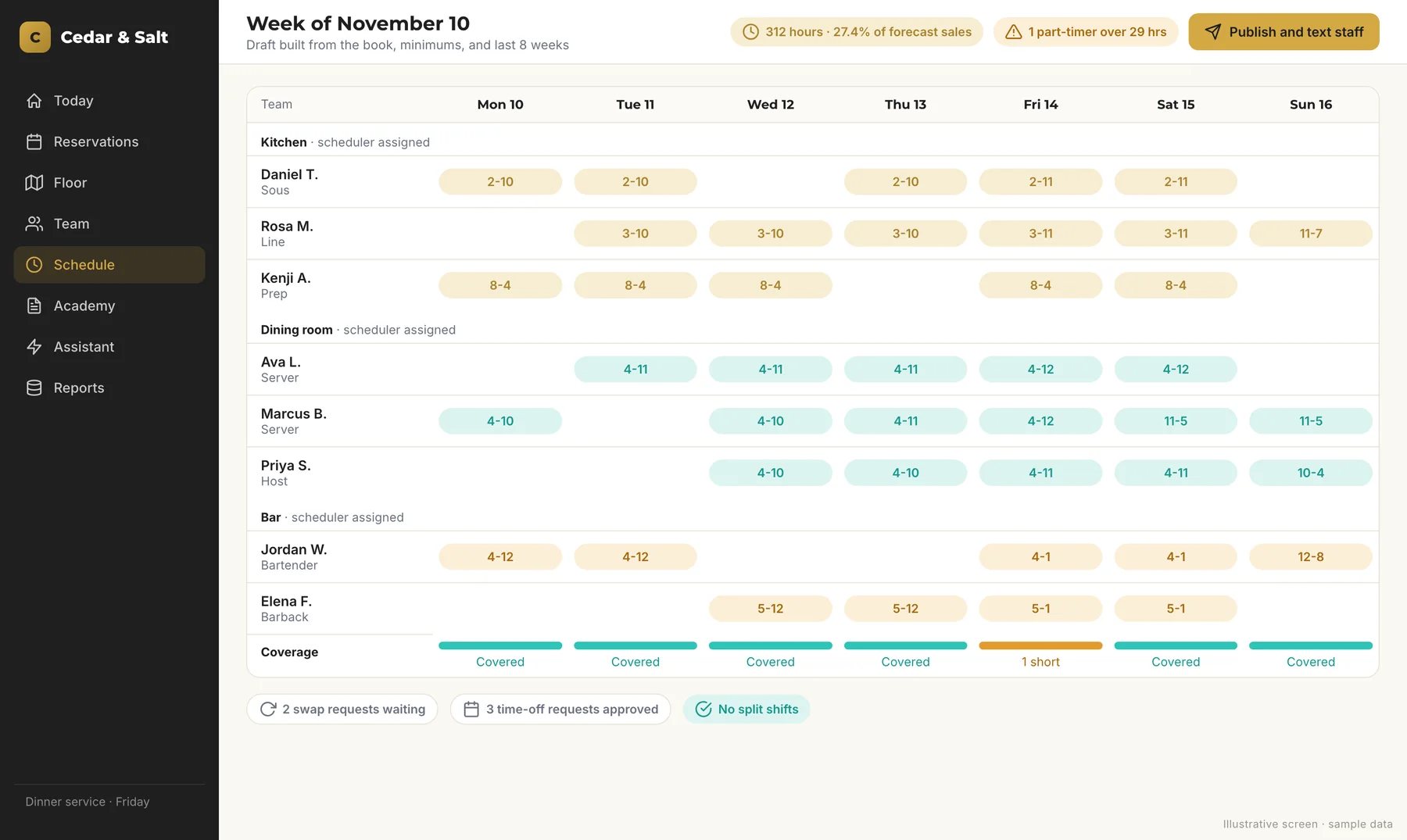
The whole week, by department, on one screen
Kitchen, dining room, bar, and any other department you run, each with a named scheduler. Coverage shows at a glance, and when the week looks right, the publish button sends it out.
Drafts that already know your rules
The first draft follows the rules your managers would otherwise check by hand.
Auto-drafted weeks
Each department's week is drafted from the book, your staffing minimums, and history, so the first version is close before anyone edits it.
Availability and time off
Drafts honor what each person can work and every time-off request you've approved.
Hour caps
Caps like 40 hours a week are respected, and part-timers who go over the line you set, such as 29 hours, get flagged.
No split shifts
Drafts can rule out split shifts, so nobody works lunch, waits around for three hours, and comes back for dinner.
Publish by text
Publishing texts each person their week. Later changes text only the people affected.
Swaps and time off
Staff request swaps, time off, and availability changes, and a manager approves each one.
See coverage before the shift and hours after it
The coverage view shows where you're thin and where you're heavy, so you can fix Friday on Tuesday. The weekly hours report shows where the hours actually went.
On the night itself, a manager board at checkout makes it easy to cut staff and send people home when the dining room slows down.
- A coverage view by department
- A weekly hours report
- A manager board for cuts at checkout
- Call-out help from the scheduling assistant, approved by a manager
Labor forecasting that keeps prime cost in view
Prime cost is your food and beverage cost plus labor, and many operators target a prime cost around 60 percent of sales. Labor is the part you set every week. These are the habits we build into how your schedule gets made.
- Labor targets by department, set with you
- Staffing minimums tied to covers on the book
- Drafts that start from your own history
- Overtime caught in the draft, before anyone works it
- Part-time hours watched every week
- Early cuts when the night slows
- Weekly hours checked against your targets
- Call-outs covered quickly, with a manager's OK
How we set up your scheduling
We do the work. You guide the process.
Listen
We walk through how you schedule today, on site or virtual, and where it breaks down.
Plan
A written plan maps your departments, schedulers, staffing minimums, and hour rules, with budget and timeline. You approve it first.
Build
We load your team, availability, and rules, and set up the drafts and text publishing.
Review
Your managers check drafts against real weeks, and their feedback tunes the rules.
Launch and support
We roll it out with your team, show staff how requests and swaps work, and stay on for support and improvements.
Scheduling at a private dining club in Vail
For a private dining club in Vail, Colorado, we built scheduling for four departments: kitchen, dining room, bar, and valet. Each has named schedulers, and weeks are auto-drafted from the book, staffing minimums, and history.
Drafts respect availability, time off, and 40-hour caps, flag part-timers over 29 hours, and never split a shift. Publishing texts each person their week, and later changes text only the people affected. Swap, time-off, and availability requests go to a manager for approval, and managers get a coverage view and a weekly hours report. Each hire uses one login for the operations app, where scheduling lives, and the training academy.
See the full case study, or read how our operations consulting ties labor to pacing and prime cost.
Frequently Asked Questions
How much does restaurant scheduling software from Monarch cost?
How long does setup take?
Does it work with my POS?
What do I need to provide?
Does it work for one restaurant and for multiple locations?



Take back the hours your managers spend on the schedule
Start with the free AI assessment. Our AI emails you an evaluation of your operations and marketing gaps, and Christy follows up personally to talk through scheduling and labor.